This document shows how to use the tool “Sale Packing List Report”. Its function is to allow the creation of packing list reports.
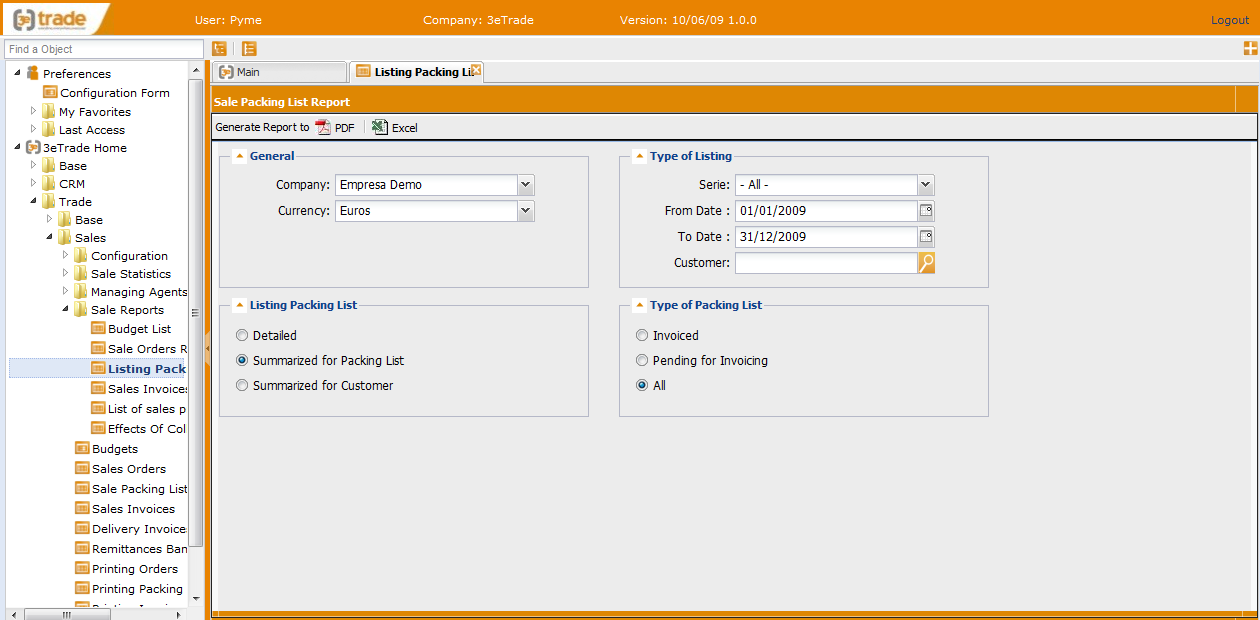
View of the main page:
Information appears distributed in four levels:
-
General:
-
Company: company from which we are going to obtain the report. The rest of the filters will be made taking into account this company.
-
Currency: currency used to see the amounts.
-
-
Type of Listing: shows fields that function as filters to see the packing list.
-
Serie: serie the packing list belong to.
-
From Date: first date from which we want to obtain the data.
-
To Date: last date to which we want to obtain the data.
-
Customer: customer from whom we want to obtain the information.
-
-
Listing Packing List: option to choose the way we want to obtain the information:
-
Datailed.
-
Summarized for Packing List.
-
Summarized for Customer.
-
-
Type of Packing List: option to choose the type of packing list we want to obtain in the report:
-
Invoiced.
-
Pending for Invoicing.
-
All.
-
Completed the fields, the user must follow these steps:
-
Click on “Generate Report to” and choose the output for the report: PDF, Excel
-
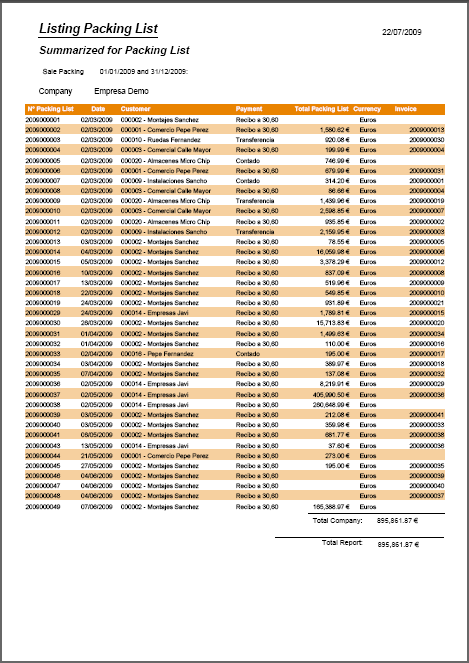
A pop up window appears with the report, taking into account all the filters.